Samaaro + Your CRM: Zero Integration Fee for Annual Sign-Ups Until 30 June, 2025
- 00Days
- 00Hrs
- 00Min

1
2
3
→
Bottom Line:
The answer is a dated table of task-audience pairs with modes, reasons, and owners, re-read quarterly.
Three Boxes and No Instructions
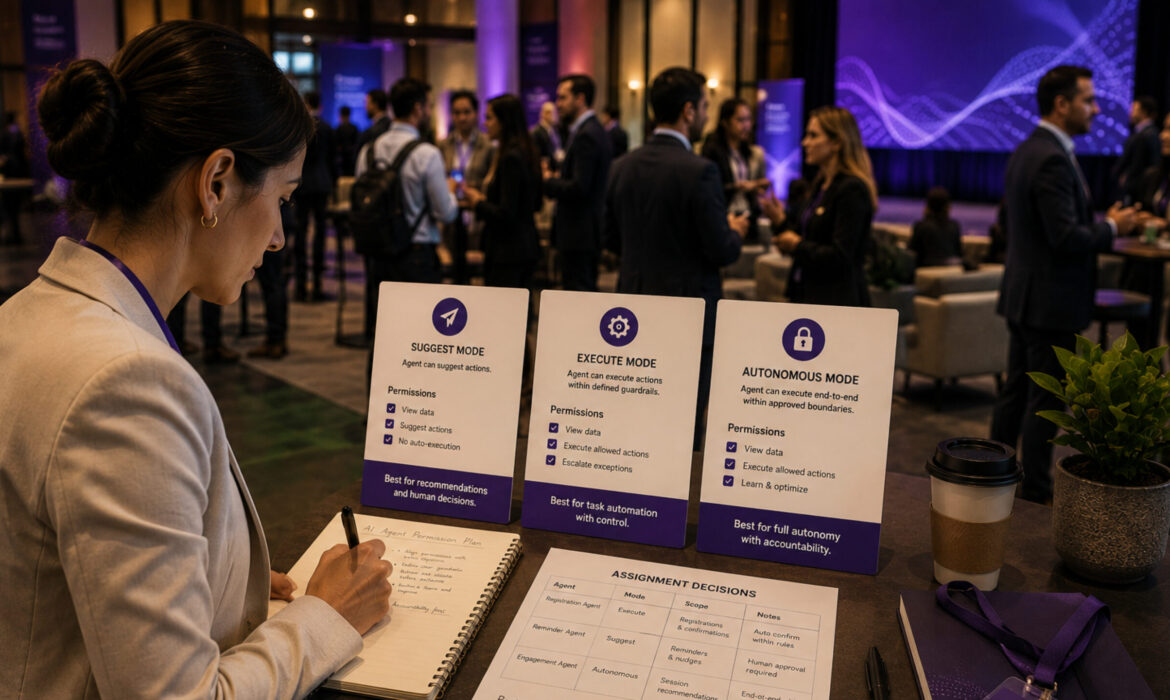
Every agent setup comes down to three modes: it does the thing, it asks you first, or it only advises. That part is easy to agree on and easy to explain. The hard part arrives when someone opens the settings screen with forty tasks in front of them and has to decide which of the three each one belongs in. AI agent permissions are not difficult to understand. They are difficult to assign.
So, how do you decide which permission mode an AI agent task belongs in? Ask three questions in order. Can the action be undone, and how fast? Reversibility matters more than importance. Who receives it? The same task belongs in different modes for different audiences. And at what volume? Volume decides whether a mode is sustainable rather than whether it is safe.
The three modes are the framework everyone starts with. The framework that gets you through the settings screen sits a level below them.
The three modes are the correct structure, and the full account of what each one covers lives elsewhere.
The structural problem is what they get attached to. Permission screens assign a mode to a task because tasks are what software has. Stakes do not live in tasks. They live in the combination of what the action is and who it lands on.
Take a reminder template. Sent to a general registrant list, it is routine, low consequence, and belongs on its own. Sent to a named senior contact at a target account, it is a customer touch that somebody should read first. Same template, same send action, two correct answers.
Which is why the question of whether the same task should have different permission modes is not academic. A system holding one mode per task forces the stricter answer onto everything, loading the ask-first queue with routine work and building the bottleneck that later gets cleared in bulk.
The unit being assigned is a task and an audience together. Teams that split their lists before setting permissions end up with a queue they can read.
The order matters because the first test rules out more than the other two combined. Here is the reminder template carried through all three.
Ask whether the action can be undone, and how fast. A sent message cannot be recalled. A record update can be reverted. A lead assignment can be reassigned in seconds. Reversible automated actions are better candidates for autonomy than important ones, because an important action you can undo costs a correction, while a trivial one you cannot undo costs a relationship. Deciding if an automated action is reversible is therefore the first filter, and applied here, it settles something immediately: sending is irreversible, so the template does not earn autonomy on the strength of being routine.
Split the recipients before assigning anything. The general registrant list and the named-accounts list are two different audiences receiving one send. Autonomous for the general list, where an imperfect reminder is a minor cost. Ask first for the named list, where it is a customer touch. One task, two assignments.
This is where the second anchor sits. A reminder template ran safely on a general list for two quarters, then the list absorbed a dozen priority accounts during a territory change. Nobody re-read the permission governing it. The mode had been right when it was set and was wrong within a month, and the setting never changed. Segmentation inside an event registration platform is what makes the split assignment possible in the first place.
Ask how often this happens in a week. Volume decides sustainability. If the named-accounts list produces a handful of approvals, ask-first holds comfortably. If it produces a hundred, ask-first has become a job description rather than a permission mode, and the honest options are to tighten the template until it needs no review, or to stop sending it. Pretending to review a hundred items is the worst available outcome, because it carries the delay of review with none of the protection.
Run the sequence and you do not get a mode per task. You get a short table of task-and-audience pairs, each with a mode and a reason.
Permission assignments get made once, carefully, by somebody thinking clearly. Then they decay in four predictable ways.
The queue solves itself. Ask-first items accumulate until the coordinator, under deadline pressure, clears the morning batch without opening individual items. The mode has become autonomous with the setting untouched. Nobody decided this deliberately. Permissions drift silently because the decay follows patterns nobody tracks.
The audience changes underneath the assignment, as it did with the template above.
Absence of incident gets read as reliability. Nothing has gone wrong, so the task earns promotion, when what the record may actually show is that the edge cases have not arrived yet.
And the author leaves. Whoever set the modes moves role, and the assignment becomes inherited configuration nobody can explain and therefore nobody will touch.
Every one of the four is a failure to re-read rather than a failure to decide, which is exactly what teams miss when they treat this as a configuration exercise. The same pattern shows up across AI adoption in events more broadly, and it explains why the fix has to be a trigger rather than better judgment.
One rule first, and it prevents the most common failure. Never promote a task to autonomous because approvals are slow. Slow approvals mean the volume test got answered wrong, and the response is to tighten the template until it needs no review or to stop the send. Removing the review and keeping the send is the one move to refuse.
Then, four events that force a re-read:
That table is the artifact: task-and-audience pairs, each with a mode, a reason, an owner, and a date. The settings screen holds the configuration and cannot hold the reasoning, and knowing who should own AI agent permission settings means having a name written next to each line. Inside event management software, the configuration lives in one place, and the table is what explains it.
The three modes are easy. The assignment is the work, and it is never finished, because the lists and templates it describes keep moving underneath it. Reversibility first, then audience, then volume, and the answer is a table rather than a setting.
So put a date on it. If that date is more than a quarter old, the table describes a system that has since changed, and the modes it lists record what somebody once intended rather than what the agent is doing now. To see permissions, audience segments, and send logs sitting in one view, request a walkthrough.
1. What does event manager software do to assign AI agent permissions by task and audience?
Event manager software holds permissions as task-plus-audience pairs, not just tasks. The same reminder can be autonomous for a general list and ask-first for named accounts. You assign the right mode to each combination instead of forcing one mode onto everything.
2. How does event management app help you split audiences before setting permissions?
Event management app lets you segment audiences so one reminder runs autonomously and another asks first. A general registrant list and a named-accounts list need different modes for the same send. Splitting first prevents routine work from bottlenecking your approval queue.
3. Why does event coordinator software need a dated permissions table?
Event coordinator software should hold a dated table of task-audience pairs with modes, reasons, and owners. If that date exceeds a quarter old, the table describes what somebody intended, not what your agent’s doing now. The coordinator re-reads it quarterly, watching for changes in audience or volume.
4. How does event planning tool help you assign the right permission mode?
Event planning tool asks three tests in order: Is it reversible? Who receives it? At what volume? A reversible action earns autonomy faster than an important one. A reminder to a general list differs from one to named accounts. Volume decides whether ask-first works or becomes a job.
5. What happens in conference management software when approval volume exceeds capacity?
When approvals cross the point where your team stops opening individual items, ask-first becomes a job, not a permission. Your threshold is yours to set. Crossing it signals a problem with the assignment. Tighten the template or stop the send. Never remove review just to speed things up.
6. How does event organizer software protect permissions from drifting silently?
Event organizer software prevents drift by forcing re-reads when audience lists change, approval volume spikes, new templates arrive, or the owner changes. Without these triggers, modes decay in silence. Absence of incidents gets read as reliability when edge cases haven’t arrived yet.

Samaaro is an AI-powered event marketing platform that enables marketing teams to turn events into a measurable growth channel by planning, promoting, executing, and measuring their business impact.
Location


© 2026 — Samaaro. All Rights Reserved.